In today’s competitive tech landscape, companies are not just looking for developers — they are looking for engineers who can deliver fast, reliable, and scalable applications.
This is where Azure DevOps + Docker + Kubernetes (AKS) becomes a game-changer.
⚡ This is a real-world DevOps project — not just theory.
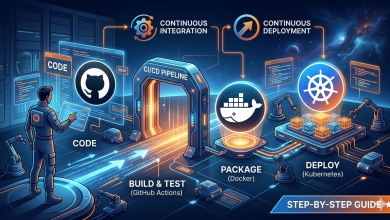
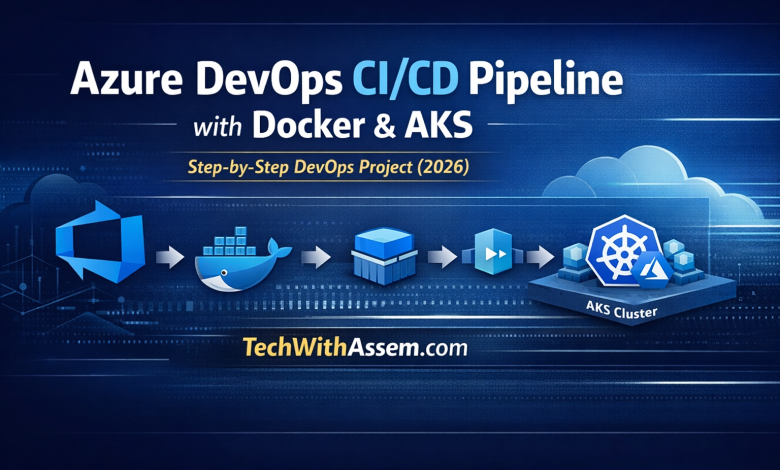
In this hands-on guide, we will build a real-world DevOps pipeline from scratch that takes your code from Git → builds a Docker image → pushes it to a registry → deploys it automatically to Azure Kubernetes Service (AKS).
By the end of this guide, you will have a production-grade pipeline that you can showcase in your portfolio.
🚀 What You Will Build
- CI/CD pipeline using Azure DevOps
- Dockerized application
- Azure Container Registry (ACR)
- Deployment on Azure Kubernetes Service (AKS)
- Full automation from code push to live deployment
🧰 Tools Used
- Azure DevOps (Pipelines)
- Docker
- Azure Container Registry (ACR)
- Azure Kubernetes Service (AKS)
- Kubectl
📁 Project Structure
/app
 |-- Dockerfile
 |-- azure-pipelines.yml
 |-- k8s/
 |   |-- deployment.yaml
 |   |-- service.yaml
 |-- src/
⚙️ Step 1: Dockerize Your Application
Create a Dockerfile:
FROM node:18-alpine
WORKDIR /app
COPY . .
RUN npm install
CMD ["node", "src/app.js"]
EXPOSE 3000
Build and test locally:
docker build -t my-app .
docker run -p 3000:3000 my-app
☁️ Step 2: Create Azure Resources
Login to Azure:
az login
Create Resource Group:
az group create --name devops-rg --location eastus
Create Azure Container Registry:
az acr create --resource-group devops-rg --name myacr123 --sku Basic
Create AKS Cluster:
az aks create \
  --resource-group devops-rg \
  --name myAKSCluster \
  --node-count 2 \
  --enable-addons monitoring \
  --generate-ssh-keys
🔐 Step 3: Connect Azure DevOps with Azure
Go to Azure DevOps → Project Settings → Service Connections → Create a new Azure Resource Manager connection.
This allows your pipeline to deploy directly to Azure securely.
⚡ Step 4: Create Azure DevOps Pipeline
Create azure-pipelines.yml:
trigger:
- main

variables:
  imageName: my-app

stages:
- stage: Build
  jobs:
  - job: BuildAndPush
    pool:
      vmImage: ubuntu-latest

    steps:
    - task: Docker@2
      inputs:
        containerRegistry: 'ACR-Service-Connection'
        repository: '$(imageName)'
        command: 'buildAndPush'
        Dockerfile: '**/Dockerfile'
        tags: latest
☸️ Step 5: Kubernetes Deployment Files

deployment.yaml
apiVersion: apps/v1
kind: Deployment
metadata:
  name: my-app
spec:
  replicas: 2
  selector:
    matchLabels:
      app: my-app
  template:
    metadata:
      labels:
        app: my-app
    spec:
      containers:
      - name: my-app
        image: myacr123.azurecr.io/my-app:latest
        ports:
        - containerPort: 3000
service.yaml
apiVersion: v1
kind: Service
metadata:
  name: my-app-service
spec:
  type: LoadBalancer
  selector:
    app: my-app
  ports:
  - port: 80
    targetPort: 3000
🚀 Step 6: Deploy to AKS Automatically
Add deployment stage:
- stage: Deploy
  dependsOn: Build
  jobs:
  - job: DeployToAKS
    pool:
      vmImage: ubuntu-latest

    steps:
    - task: Kubernetes@1
      inputs:
        connectionType: 'Azure Resource Manager'
        azureSubscriptionEndpoint: 'Azure-Service-Connection'
        azureResourceGroup: 'devops-rg'
        kubernetesCluster: 'myAKSCluster'
        command: apply
        useConfigurationFile: true
        configuration: k8s/deployment.yaml
📊 Step 7: Verify Deployment
kubectl get pods
kubectl get services
Once the external IP appears, your application is live 🚀
🔐 Security Best Practices
- Use Azure Key Vault for secrets
- Enable RBAC in AKS
- Use managed identities instead of passwords
- Scan Docker images (Trivy / Defender)
📈 Production Tips
- Use Helm for better deployments
- Enable autoscaling in AKS
- Add monitoring (Prometheus + Grafana)
- Implement Blue/Green deployments
❓ FAQs
What is CI/CD in Azure DevOps?
CI/CD is the process of automating build, test, and deployment using Azure DevOps pipelines.
Is AKS better than Kubernetes?
AKS is a managed Kubernetes service, making it easier to deploy and manage clusters.
🔥 Final Thoughts
You’ve now built a complete DevOps pipeline using Azure DevOps, Docker, and Kubernetes.
This is not just a tutorial — this is a real-world project you can showcase in interviews and on your portfolio.
If you want to stand out as a DevOps engineer in 2026, mastering pipelines like this is no longer optional — it’s essential.